







Personal Safety - Safety Button
Safety Button
Help that’s always just a button press away.

Why Safety Button
Protection beyond your front door
Get 24/7 access to trained emergency operators through the Alarm.com app.
One-touch emergency help
Connect to a trained operator anytime with the press of a button.
GPS location sharing
If you can't speak or don't know where you are, operators can locate your phone.
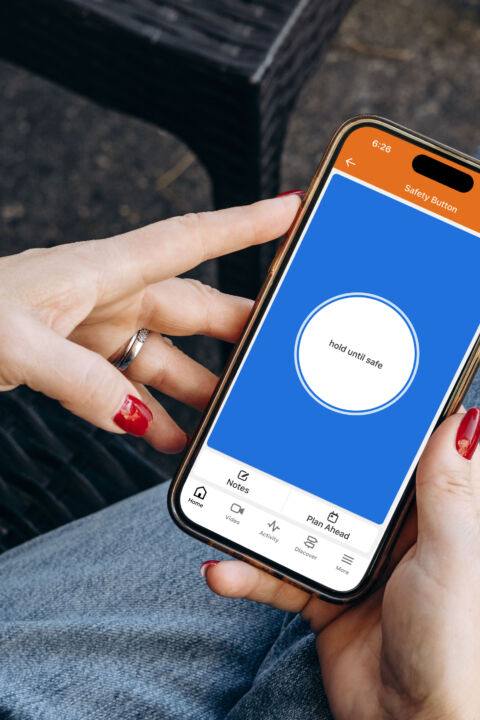
Proactive safety check-ins
Schedule a check-in. If you don't respond, help is dispatched.
Protection wherever you go
Access emergency assistance at home, on the road, or anywhere else in the U.S.
Three ways to use it

Plan ahead
Meeting with a stranger? Schedule a safety check-in ahead of time.

Trust your instincts
Hold the button when you feel unsafe. Release to call for help or cancel.

Get help now
Just tap to connect to a trained operator right away.
How It Helps
Go confidently, knowing help is within reach

Walking alone at night
Feel more confident heading home, walking the dog, or running errands after dark.

Meeting someone new
Schedule a safety check-in before a blind date or meeting an online acquaintance.

Running or hiking solo
Adventure, knowing help can find your location if something goes wrong.

When you're stranded
Feel more confident while waiting for roadside assistance or someone you trust to arrive.

Family members on the go
Give loved ones an added layer of protection whether they're commuting, traveling, or away at school.
Safety Button In Action
Take a closer look
Innovative features that keep you safe

Help on standby
Connect with trained operators 24/7 with the press of a button.

Discreet support
Operators text first, allowing you to communicate quietly when necessary.

Location history
Operators can access your last known location, even if your phone is broken, and send help right away.

Proactive features
Schedule check-ins, add notes with meeting details, and more.

No new app required
Access personal safety protection right from the Alarm.com app.

Quick-access widget
Add the Safety Button widget to your home screen for even easier access.
Real life scenarios for the people you care for




Next Step
Ready to get serious?
Backed by professional monitoring and installation, Alarm.com goes beyond the basics to keep your home secure.